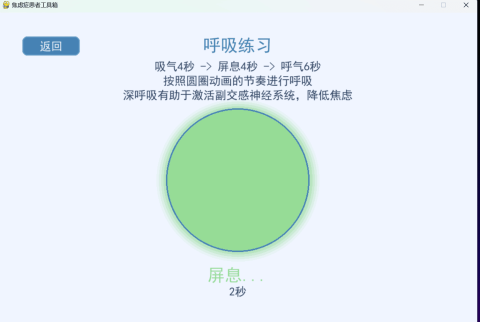
上个月因为工作原因自我焦虑了,经过一个月治疗有所好转,于是出于焦虑就用python写了一个小软件。不知道论坛中有没有平常会焦虑的朋友,可以下载来看看,其中有20道焦虑症自测题(题目来源是GAD-7焦虑测试题),还有几个缓解压力的小游戏随便写着玩的(不保证有效果),还有一个环境音乐播放我没下载音乐素材,有会的大佬可以自己找几首环境音素材来添加进去。已经打包成EXE文件。
下载
蓝奏云:https://wwto.lanzouu.com/iW086363ua2f
我把代码附到下面,大家可以自行添加环境音素材。
[Python] - import pygame
- import sys
- import random
- import math
- import time
- import os
- from pygame import gfxdraw
- # 初始化pygame
- pygame.init()
- pygame.font.init()
- pygame.mixer.init()
- # 屏幕尺寸
- SCREEN_WIDTH = 1000
- SCREEN_HEIGHT = 700
- screen = pygame.display.set_mode((SCREEN_WIDTH, SCREEN_HEIGHT))
- pygame.display.set_caption("焦虑症患者工具箱")
- # 颜色定义
- BACKGROUND = (240, 245, 255)
- ACCENT = (70, 130, 180)
- LIGHT_ACCENT = (100, 160, 210)
- BUTTON_COLOR = (70, 130, 180)
- BUTTON_HOVER = (90, 150, 200)
- TEXT_COLOR = (50, 70, 100)
- LIGHT_TEXT = (240, 245, 255)
- WHITE = (255, 255, 255)
- GREEN = (100, 200, 100)
- RED = (220, 100, 100)
- YELLOW = (250, 200, 100)
- PURPLE = (180, 120, 200)
- LIGHT_GREEN = (200, 240, 200)
- LIGHT_RED = (240, 200, 200)
- LIGHT_YELLOW = (255, 240, 200)
- # 字体
- title_font = pygame.font.SysFont("simhei", 48)
- heading_font = pygame.font.SysFont("simhei", 36)
- normal_font = pygame.font.SysFont("simhei", 24)
- small_font = pygame.font.SysFont("simhei", 20)
- # 免责声明
- disclaimer_text = [
- "免责声明:",
- "1. 本工具箱提供的所有内容,包括焦虑自测工具和解压游戏,仅供娱乐和参考用途,",
- " 不能替代专业医疗诊断、治疗或建议。",
- "2. 如果您正在经历严重的焦虑症状或有心理健康问题,请务必咨询专业的医疗人员、",
- " 心理医生或其他合格的健康服务提供者。",
- "3. 本程序的开发者和分发者不对因使用本程序而导致的任何直接或间接损失承担责任,",
- " 包括但不限于因依赖程序内容而导致的任何健康问题。",
- "4. 自测结果仅供参考,不能作为任何临床诊断的依据。",
- "5. 解压游戏的效果因人而异,不能保证对每个人都有效。",
- "6. 继续使用本程序即表示您理解并同意上述免责条款。"
- ]
- # 焦虑自测题目 - 扩展版 (基于GAD-7和附加问题)
- test_questions = [
- "1. 我感到紧张、焦虑或心烦意乱",
- "2. 我无法停止或控制担忧",
- "3. 我对各种事情过度担忧",
- "4. 我很难放松",
- "5. 我由于不安而无法静坐",
- "6. 我变得容易烦恼或易怒",
- "7. 我感到害怕,好像会发生可怕的事情",
- "8. 我感到疲劳或容易疲倦",
- "9. 我注意力难以集中或头脑一片空白",
- "10. 我有睡眠问题(难以入睡、易醒或睡眠过多)",
- "11. 我感到肌肉紧张或身体不适",
- "12. 我避免可能引起焦虑的情境",
- "13. 我出现心悸或心跳加速",
- "14. 我出汗过多(并非因炎热或运动)",
- "15. 我感到颤抖或手脚发抖",
- "16. 我呼吸急促或有窒息感",
- "17. 我感到恶心或腹部不适",
- "18. 我感到头晕、头昏或不稳定",
- "19. 我有不真实感或分离感",
- "20. 我害怕失去控制或'发疯'"
- ]
- test_options = [
- "完全没有",
- "有几天",
- "一半以上时间",
- "几乎每天"
- ]
- # 游戏状态
- class State:
- DISCLAIMER = 0
- MAIN_MENU = 1
- ANXIETY_TEST = 2
- BREATHING_EXERCISE = 3
- COLORING_GAME = 4
- BALLOON_POP = 5
- NATURE_SOUNDS = 6
- TEST_RESULT = 7
- current_state = State.DISCLAIMER
- # 测试分数
- test_score = 0
- current_question = 0
- test_answers = []
- # 游戏变量
- breath_progress = 0
- breath_phase = 0 # 0: inhale, 1: hold, 2: exhale
- breath_colors = [(100, 180, 255), (150, 220, 150), (255, 200, 100)]
- breath_times = [4, 4, 6] # 吸气、屏息、呼气时间(秒)
- breath_start_time = 0
- coloring_shapes = []
- for i in range(30):
- size = random.randint(30, 80)
- x = random.randint(50, SCREEN_WIDTH - 50)
- y = random.randint(100, SCREEN_HEIGHT - 50)
- color = (random.randint(150, 230), random.randint(150, 230), random.randint(150, 230))
- shape_type = random.choice(["circle", "square", "triangle", "star"])
- coloring_shapes.append({"x": x, "y": y, "size": size, "color": color, "type": shape_type, "filled": False})
- balloons = []
- for i in range(20):
- balloons.append({
- "x": random.randint(50, SCREEN_WIDTH - 50),
- "y": SCREEN_HEIGHT + random.randint(0, 100),
- "speed": random.uniform(0.5, 2.0),
- "color": (random.randint(100, 255), random.randint(100, 255), random.randint(100, 255)),
- "size": random.randint(30, 60),
- "popped": False,
- "pop_time": 0
- })
- # 创建声音对象
- try:
- # 尝试加载声音文件(如果存在)
- ocean_sound = pygame.mixer.Sound("ocean.wav") if os.path.exists("ocean.wav") else None
- rain_sound = pygame.mixer.Sound("rain.wav") if os.path.exists("rain.wav") else None
- forest_sound = pygame.mixer.Sound("forest.wav") if os.path.exists("forest.wav") else None
- birds_sound = pygame.mixer.Sound("birds.wav") if os.path.exists("birds.wav") else None
- stream_sound = pygame.mixer.Sound("stream.wav") if os.path.exists("stream.wav") else None
- except:
- # 如果加载失败,设置为None
- ocean_sound = rain_sound = forest_sound = birds_sound = stream_sound = None
- sounds = [
- {"name": "海浪声", "color": (70, 130, 180), "sound_obj": ocean_sound},
- {"name": "雨声", "color": (100, 150, 200), "sound_obj": rain_sound},
- {"name": "森林", "color": (80, 160, 120), "sound_obj": forest_sound},
- {"name": "鸟鸣", "color": (180, 200, 100), "sound_obj": birds_sound},
- {"name": "溪流", "color": (100, 180, 230), "sound_obj": stream_sound}
- ]
- selected_sound = None
- sound_timer = 0
- # 按钮类
- class Button:
- def __init__(self, x, y, width, height, text, action=None):
- self.rect = pygame.Rect(x, y, width, height)
- self.text = text
- self.action = action
- self.hovered = False
- def draw(self, surface):
- color = BUTTON_HOVER if self.hovered else BUTTON_COLOR
- pygame.draw.rect(surface, color, self.rect, border_radius=10)
- pygame.draw.rect(surface, LIGHT_ACCENT, self.rect, width=2, border_radius=10)
- text_surf = normal_font.render(self.text, True, LIGHT_TEXT)
- text_rect = text_surf.get_rect(center=self.rect.center)
- surface.blit(text_surf, text_rect)
- def check_hover(self, pos):
- self.hovered = self.rect.collidepoint(pos)
- def handle_event(self, event):
- if event.type == pygame.MOUSEBUTTONDOWN and event.button == 1:
- if self.hovered and self.action:
- self.action()
- return True
- return False
- # 创建按钮
- disclaimer_agree_button = Button(SCREEN_WIDTH//2 - 100, SCREEN_HEIGHT - 100, 200, 50, "同意并继续", lambda: set_state(State.MAIN_MENU))
- main_menu_buttons = [
- Button(SCREEN_WIDTH//2 - 150, 200, 300, 60, "焦虑症自测", lambda: set_state(State.ANXIETY_TEST)),
- Button(SCREEN_WIDTH//2 - 150, 280, 300, 60, "呼吸练习", lambda: set_state(State.BREATHING_EXERCISE)),
- Button(SCREEN_WIDTH//2 - 150, 360, 300, 60, "填色游戏", lambda: set_state(State.COLORING_GAME)),
- Button(SCREEN_WIDTH//2 - 150, 440, 300, 60, "气球游戏", lambda: set_state(State.BALLOON_POP)),
- Button(SCREEN_WIDTH//2 - 150, 520, 300, 60, "自然声音", lambda: set_state(State.NATURE_SOUNDS))
- ]
- test_buttons = [
- Button(SCREEN_WIDTH//2 - 300, 500, 150, 40, "上一题", lambda: navigate_question(-1)),
- Button(SCREEN_WIDTH//2 + 150, 500, 150, 40, "下一题", lambda: navigate_question(1))
- ]
- result_button = Button(SCREEN_WIDTH//2 - 100, 600, 200, 50, "返回主菜单", lambda: set_state(State.MAIN_MENU))
- back_button = Button(50, 50, 120, 40, "返回", lambda: set_state(State.MAIN_MENU))
- # 状态管理
- def set_state(state):
- global current_state, test_score, current_question, test_answers, selected_sound
- # 停止任何正在播放的声音
- if selected_sound and selected_sound["sound_obj"]:
- selected_sound["sound_obj"].stop()
- selected_sound = None
- if state == State.MAIN_MENU:
- test_score = 0
- current_question = 0
- test_answers = []
- current_state = state
- # 测试导航
- def navigate_question(direction):
- global current_question
- if direction == 1 and current_question < len(test_questions):
- current_question += 1
- elif direction == -1 and current_question > 0:
- current_question -= 1
- # 处理测试选项选择
- def handle_test_selection(option_index):
- global test_answers, test_score, current_question
- if current_question < len(test_questions):
- # 确保answers列表足够长
- while len(test_answers) current_question and test_answers[current_question] == i
- color = LIGHT_ACCENT if hovered or selected else ACCENT
- pygame.draw.rect(screen, color, option_rect, border_radius=8)
- option_text = normal_font.render(option, True, LIGHT_TEXT)
- screen.blit(option_text, (option_rect.centerx - option_text.get_width()//2,
- option_rect.centery - option_text.get_height()//2))
- if current_question > 0:
- test_buttons[0].draw(screen)
- if current_question < len(test_questions):
- test_buttons[1].draw(screen)
- # 绘制测试结果
- def draw_test_result():
- screen.fill(BACKGROUND)
- title = heading_font.render("测试结果", True, ACCENT)
- screen.blit(title, (SCREEN_WIDTH//2 - title.get_width()//2, 50))
- score_text = heading_font.render(f"您的得分: {test_score}/{len(test_questions)*3}", True, TEXT_COLOR)
- screen.blit(score_text, (SCREEN_WIDTH//2 - score_text.get_width()//2, 120))
- if test_score phase_duration:
- breath_start_time = current_time
- breath_phase = (breath_phase + 1) % 3
- elapsed = 0
- breath_progress = elapsed / phase_duration
- if breath_phase == 0: # 吸气
- radius = int(max_radius * breath_progress)
- elif breath_phase == 1: # 屏息
- radius = max_radius
- else: # 呼气
- radius = int(max_radius * (1 - breath_progress))
- color = breath_colors[breath_phase]
- # 绘制同心圆
- for i in range(5, 0, -1):
- alpha = 100 - i * 20
- circle_color = (color[0], color[1], color[2], alpha)
- pygame.gfxdraw.filled_circle(screen, center_x, center_y, radius + i*5, circle_color)
- pygame.draw.circle(screen, color, (center_x, center_y), radius)
- pygame.draw.circle(screen, ACCENT, (center_x, center_y), radius, 3)
- phase_texts = ["吸气...", "屏息...", "呼气..."]
- text = heading_font.render(phase_texts[breath_phase], True, color)
- screen.blit(text, (SCREEN_WIDTH//2 - text.get_width()//2, center_y + max_radius + 30))
- # 绘制计时器
- timer_text = normal_font.render(f"{int(elapsed)}秒", True, TEXT_COLOR)
- screen.blit(timer_text, (SCREEN_WIDTH//2 - timer_text.get_width()//2, center_y + max_radius + 70))
- # 绘制填色游戏
- def draw_coloring_game():
- screen.fill(BACKGROUND)
- back_button.draw(screen)
- title = heading_font.render("填色游戏", True, ACCENT)
- screen.blit(title, (SCREEN_WIDTH//2 - title.get_width()//2, 50))
- instruction = normal_font.render("点击图形进行填色 - 创建您自己的放松图案", True, TEXT_COLOR)
- screen.blit(instruction, (SCREEN_WIDTH//2 - instruction.get_width()//2, 100))
- for shape in coloring_shapes:
- color = shape["color"] if shape["filled"] else (220, 220, 220)
- border_color = (180, 180, 180) if not shape["filled"] else (color[0]//2, color[1]//2, color[2]//2)
- if shape["type"] == "circle":
- pygame.draw.circle(screen, color, (shape["x"], shape["y"]), shape["size"])
- pygame.draw.circle(screen, border_color, (shape["x"], shape["y"]), shape["size"], 2)
- elif shape["type"] == "square":
- rect = pygame.Rect(shape["x"] - shape["size"]//2, shape["y"] - shape["size"]//2,
- shape["size"], shape["size"])
- pygame.draw.rect(screen, color, rect, border_radius=5)
- pygame.draw.rect(screen, border_color, rect, width=2, border_radius=5)
- elif shape["type"] == "triangle":
- points = [
- (shape["x"], shape["y"] - shape["size"]//2),
- (shape["x"] - shape["size"]//2, shape["y"] + shape["size"]//2),
- (shape["x"] + shape["size"]//2, shape["y"] + shape["size"]//2)
- ]
- pygame.draw.polygon(screen, color, points)
- pygame.draw.polygon(screen, border_color, points, width=2)
- else: # star
- points = []
- for i in range(10):
- angle = math.pi/2 + i * math.pi/5
- radius = shape["size"] if i % 2 == 0 else shape["size"]//2
- x = shape["x"] + radius * math.cos(angle)
- y = shape["y"] - radius * math.sin(angle)
- points.append((x, y))
- pygame.draw.polygon(screen, color, points)
- pygame.draw.polygon(screen, border_color, points, width=2)
- # 绘制气球游戏
- def draw_balloon_pop():
- global balloons
- screen.fill(BACKGROUND)
- back_button.draw(screen)
- title = heading_font.render("气球游戏", True, ACCENT)
- screen.blit(title, (SCREEN_WIDTH//2 - title.get_width()//2, 50))
- instruction = normal_font.render("点击上升的气球 - 专注于目标有助于分散焦虑", True, TEXT_COLOR)
- screen.blit(instruction, (SCREEN_WIDTH//2 - instruction.get_width()//2, 100))
- # 更新气球位置
- for balloon in balloons:
- if balloon["popped"]:
- # 处理爆炸效果
- if time.time() - balloon["pop_time"] > 1.0:
- balloon["y"] = SCREEN_HEIGHT + random.randint(0, 50)
- balloon["x"] = random.randint(50, SCREEN_WIDTH - 50)
- balloon["popped"] = False
- else:
- # 绘制爆炸效果
- explosion_size = balloon["size"] * 2 * (time.time() - balloon["pop_time"])
- pygame.draw.circle(screen, (255, 200, 100), (int(balloon["x"]), int(balloon["y"])), int(explosion_size), 2)
- for i in range(8):
- angle = i * math.pi/4
- end_x = balloon["x"] + explosion_size * math.cos(angle)
- end_y = balloon["y"] + explosion_size * math.sin(angle)
- pygame.draw.line(screen, (255, 150, 50), (balloon["x"], balloon["y"]), (end_x, end_y), 2)
- else:
- balloon["y"] -= balloon["speed"]
- if balloon["y"] < -50:
- balloon["y"] = SCREEN_HEIGHT + random.randint(0, 50)
- balloon["x"] = random.randint(50, SCREEN_WIDTH - 50)
- # 绘制气球
- pygame.draw.circle(screen, balloon["color"], (int(balloon["x"]), int(balloon["y"])), balloon["size"])
- # 气球高光
- highlight_size = balloon["size"] // 3
- highlight_pos = (balloon["x"] - highlight_size, balloon["y"] - highlight_size)
- pygame.draw.circle(screen, (255, 255, 255, 150), highlight_pos, highlight_size)
- # 气球底部
- pygame.draw.line(screen, TEXT_COLOR,
- (balloon["x"], balloon["y"] + balloon["size"]),
- (balloon["x"] + random.randint(-10, 10), balloon["y"] + balloon["size"] + 15), 2)
- # 绘制自然声音
- def draw_nature_sounds():
- global selected_sound, sound_timer
- screen.fill(BACKGROUND)
- back_button.draw(screen)
- title = heading_font.render("自然声音", True, ACCENT)
- screen.blit(title, (SCREEN_WIDTH//2 - title.get_width()//2, 50))
- instruction = normal_font.render("选择一种自然声音进行放松 - 自然声音有助于降低压力水平", True, TEXT_COLOR)
- screen.blit(instruction, (SCREEN_WIDTH//2 - instruction.get_width()//2, 100))
- # 绘制声音选项
- for i, sound in enumerate(sounds):
- button_rect = pygame.Rect(SCREEN_WIDTH//2 - 150, 150 + i*60, 300, 50)
- hovered = button_rect.collidepoint(pygame.mouse.get_pos())
- # 检查是否是当前选中的声音
- is_selected = selected_sound == sound
- color = LIGHT_ACCENT if hovered or is_selected else sound["color"]
- pygame.draw.rect(screen, color, button_rect, border_radius=8)
- sound_text = normal_font.render(sound["name"], True, LIGHT_TEXT)
- screen.blit(sound_text, (button_rect.centerx - sound_text.get_width()//2,
- button_rect.centery - sound_text.get_height()//2))
- # 如果声音文件不存在,显示提示
- if sound["sound_obj"] is None:
- warning = small_font.render("(声音文件未找到)", True, (255, 100, 100))
- screen.blit(warning, (button_rect.right - warning.get_width() - 10,
- button_rect.centery - warning.get_height()//2))
- # 显示当前选择的声音
- if selected_sound is not None:
- text = normal_font.render(f"正在播放: {selected_sound['name']}", True, TEXT_COLOR)
- screen.blit(text, (SCREEN_WIDTH//2 - text.get_width()//2, SCREEN_HEIGHT - 100))
- # 绘制声波动画
- center_x, center_y = SCREEN_WIDTH//2, SCREEN_HEIGHT - 150
- max_radius = 50
- for i in range(3):
- radius = max_radius + math.sin(sound_timer + i) * 15
- alpha = 200 - i * 70
- wave_color = (selected_sound["color"][0], selected_sound["color"][1], selected_sound["color"][2], alpha)
- pygame.gfxdraw.filled_circle(screen, center_x, center_y, int(radius), wave_color)
- sound_timer += 0.1
- # 停止按钮
- stop_button = pygame.Rect(SCREEN_WIDTH//2 + 150, SCREEN_HEIGHT - 100, 100, 30)
- pygame.draw.rect(screen, (200, 100, 100), stop_button, border_radius=5)
- stop_text = small_font.render("停止", True, LIGHT_TEXT)
- screen.blit(stop_text, (stop_button.centerx - stop_text.get_width()//2,
- stop_button.centery - stop_text.get_height()//2))
- # 主游戏循环
- clock = pygame.time.Clock()
- running = True
- while running:
- mouse_pos = pygame.mouse.get_pos()
- for event in pygame.event.get():
- if event.type == pygame.QUIT:
- running = False
- if current_state == State.DISCLAIMER:
- disclaimer_agree_button.check_hover(mouse_pos)
- if event.type == pygame.MOUSEBUTTONDOWN:
- disclaimer_agree_button.handle_event(event)
- elif current_state == State.MAIN_MENU:
- for button in main_menu_buttons:
- button.check_hover(mouse_pos)
- if event.type == pygame.MOUSEBUTTONDOWN:
- button.handle_event(event)
- elif current_state == State.ANXIETY_TEST:
- back_button.check_hover(mouse_pos)
- test_buttons[0].check_hover(mouse_pos)
- test_buttons[1].check_hover(mouse_pos)
- if event.type == pygame.MOUSEBUTTONDOWN:
- if back_button.handle_event(event):
- continue
- if current_question > 0:
- test_buttons[0].handle_event(event)
- if current_question < len(test_questions):
- test_buttons[1].handle_event(event)
- # 检查选项点击
- for i in range(len(test_options)):
- option_rect = pygame.Rect(SCREEN_WIDTH//2 - 150, 250 + i*60, 300, 50)
- if option_rect.collidepoint(mouse_pos):
- handle_test_selection(i)
- elif current_state == State.TEST_RESULT:
- result_button.check_hover(mouse_pos)
- if event.type == pygame.MOUSEBUTTONDOWN:
- result_button.handle_event(event)
- elif current_state in [State.BREATHING_EXERCISE, State.COLORING_GAME,
- State.BALLOON_POP, State.NATURE_SOUNDS]:
- back_button.check_hover(mouse_pos)
- if event.type == pygame.MOUSEBUTTONDOWN:
- if back_button.handle_event(event):
- continue
- if current_state == State.COLORING_GAME:
- for shape in coloring_shapes:
- dist = math.sqrt((mouse_pos[0] - shape["x"])**2 + (mouse_pos[1] - shape["y"])**2)
- if dist < shape["size"]:
- shape["filled"] = not shape["filled"]
- if shape["filled"]:
- shape["color"] = (random.randint(100, 255), random.randint(100, 255), random.randint(100, 255))
- elif current_state == State.BALLOON_POP:
- for balloon in balloons:
- dist = math.sqrt((mouse_pos[0] - balloon["x"])**2 + (mouse_pos[1] - balloon["y"])**2)
- if dist < balloon["size"] and not balloon["popped"]:
- balloon["popped"] = True
- balloon["pop_time"] = time.time()
- elif current_state == State.NATURE_SOUNDS:
- # 检查声音选项点击
- for i, sound in enumerate(sounds):
- button_rect = pygame.Rect(SCREEN_WIDTH//2 - 150, 150 + i*60, 300, 50)
- if button_rect.collidepoint(mouse_pos):
- # 停止当前声音
- if selected_sound and selected_sound["sound_obj"]:
- selected_sound["sound_obj"].stop()
- # 播放新声音
- if sound["sound_obj"]:
- sound["sound_obj"].play(-1) # -1表示循环播放
- selected_sound = sound
- # 检查停止按钮点击
- if selected_sound:
- stop_button = pygame.Rect(SCREEN_WIDTH//2 + 150, SCREEN_HEIGHT - 100, 100, 30)
- if stop_button.collidepoint(mouse_pos):
- selected_sound["sound_obj"].stop()
- selected_sound = None
- # 绘制当前状态
- if current_state == State.DISCLAIMER:
- draw_disclaimer()
- elif current_state == State.MAIN_MENU:
- draw_main_menu()
- elif current_state == State.ANXIETY_TEST:
- draw_anxiety_test()
- elif current_state == State.TEST_RESULT:
- draw_test_result()
- elif current_state == State.BREATHING_EXERCISE:
- draw_breathing_exercise()
- elif current_state == State.COLORING_GAME:
- draw_coloring_game()
- elif current_state == State.BALLOON_POP:
- draw_balloon_pop()
- elif current_state == State.NATURE_SOUNDS:
- draw_nature_sounds()
- pygame.display.flip()
- clock.tick(60)
- # 退出前停止所有声音
- if selected_sound and selected_sound["sound_obj"]:
- selected_sound["sound_obj"].stop()
- pygame.quit()
- sys.exit()
|



 立即注册
立即注册 登录
登录